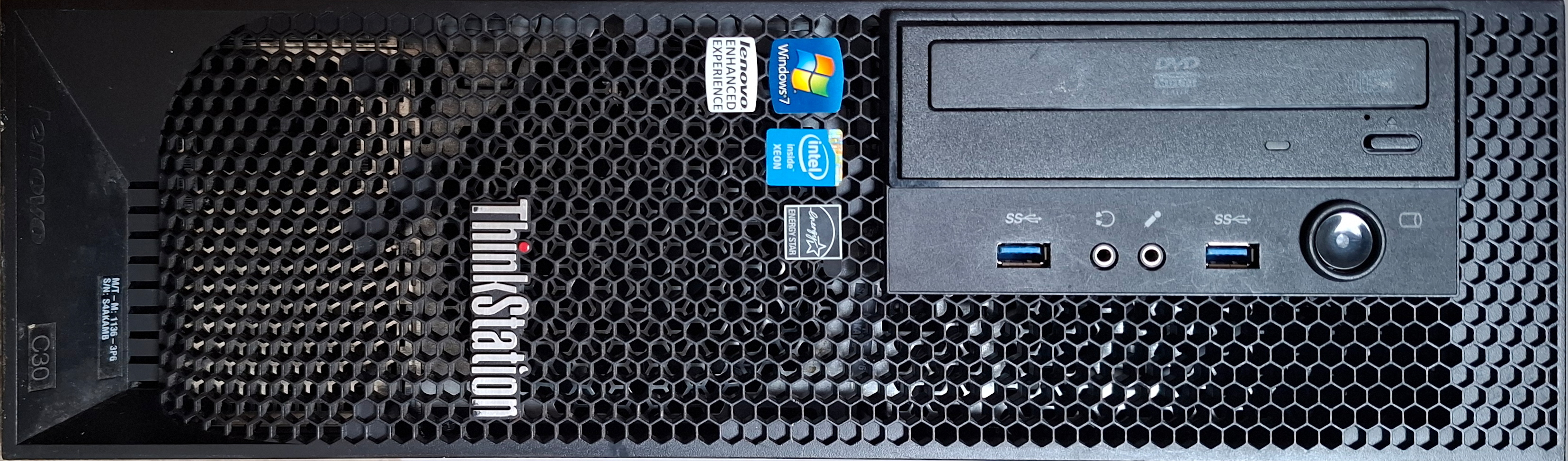
Firefly, my NAS, has been quietly absorbing homelab experiments for a while. It was fine for hosting Wazuh that I don’t really need, or for running something small in Docker and deleting it after a few hours.
But then I decided to experiment with ML. That’s mostly done on a GPU, but Firefly’s tiny CPU and especially 8GB of RAM would still be a limitation. I decided to have a separate computer and name it Serenity (I hope you recognise the pattern). Now that I had a hostname, I only needed the hardware.
Like I explained in Green IT, my first instinct is always to reuse what I have. And I just happen to have two Lenovo ThinkStations: a D20 and a C30. Both were sold as powerful workstations for CAD and similar tasks. Corporations renew their hardware, so I bought them very cheaply when they were about 4-5 years old, to have some serious processing power for photo and video editing. Some time later, I upgraded my laptop and a separate machine became unnecessary. They were in the back of the garage since then.
The two machines
The D20 is from 2010, built around the Nehalem/Westmere-EP generation - Intel’s X58 chipset, LGA1366 sockets. The one I have came with a pair of Xeon E5620s. It has a large tower case (almost as big as my NAS) and makes a noise like a jet engine when it boots.
The C30 is from 2012, one generation newer - Sandy Bridge-EP, Intel’s C602 chipset, LGA2011 sockets, a pair of Xeon E5-2609. It’s small and quiet, despite many fans, and its PSU is 80+ Gold certified. I guess I would choose it even if it didn’t win the performance race. Incidentally, it also came with the NVS 315 I wrote about before.
Both had 16GB of RAM. Both CPUs were the mid-range server option of their era, better than consumer CPUs but not top of the line. Let’s see how they compare to my NAS, my laptop, and a modern consumer CPU that would be a reasonable choice.
Correction
My old notes said a pair of Xeon E5-2620s. Turns out that was wrong: when I actually booted the machine and checked with lscpu, it’s a pair of Xeon E5-2609s instead - a cheaper CPU of the same generation (4 cores each instead of 6, no Hyper-Threading, no Turbo Boost). That changes the numbers quite a lot. It’s actually slower than D20 in the multithread benchmark (although that’s because of D20’s Hyper-Threading, which doubles the benchmark score, but in real workloads the speedup is less than 2x). Unless, of course, the D20 also has different CPUs than I think.
CPU specs
| Pentium G3220T (single, Firefly) | Xeon E5620 ×2 (D20) | Xeon E5-2609 ×2 (C30) | Core i5-14400 (single, modern) | Core i5-10310U (single, laptop) | |
|---|---|---|---|---|---|
| Microarchitecture | Haswell (2014) | Westmere-EP (2010) | Sandy Bridge-EP (2012) | Raptor Lake refresh (2024) | Comet Lake-U (2020) |
| Cores/threads per socket | 2 / 2 | 4 / 8 | 4 / 4 | 10 / 16 (6P+4E) | 4 / 8 |
| Cores/threads, combined | - | 8 / 16 | 8 / 8 | - | - |
| Base / turbo clock | 2.6 GHz (no turbo) | 2.4 / 2.7 GHz | 2.4 GHz (no turbo) | 2.5 / 4.7 GHz | 1.7 / 4.4 GHz |
| L3 cache per socket | 3 MB | 12 MB | 10 MB | 20 MB | 6 MB |
| TDP | 35W | 80W / 160W combined | 80W / 160W combined | 65W (148W peak) | 15W (10-25W cTDP) |
| Socket | LGA1150 | LGA1366 | LGA2011 | LGA1700 | FCBGA1528 (soldered) |
| Memory channels per socket | 2 (DDR3) | 3 (DDR3-800/1066) | 4 (DDR3-800/1066) | 2 (DDR5-4800 or DDR4-3200) | 2 (DDR4-2666) |
| Max memory bandwidth per socket | 21.3 GB/s | 25.6 GB/s | 34.1 GB/s | 76.8 GB/s | 42.7 GB/s |
| PCIe | 16 lanes PCIe 3.0, on-die | 36 lanes PCIe 2.0, centralised in the X58 IOH | 40 lanes PCIe 3.0 per socket, on-die | 20 lanes PCIe 4.0/5.0, on-die | 16 lanes PCIe 3.0, on-die |
| Inter-socket link | n/a (one socket) | QPI 5.86 GT/s (~23 GB/s) | QPI 6.4 GT/s (~26 GB/s) | n/a (one die) | n/a (one socket) |
| PassMark single-thread | 1,476 | 1,075 | 1,130 | 3,740 | 2,109 |
| PassMark CPU Mark | 1,636 | 6,504 combined | 5,860 combined | 25,085 | 5,929 |
(Single-CPU PassMark figures, for reference: E5620 scores 3,517 alone, E5-2609 scores 2,900 alone. Source: PassMark CPU Benchmarks.)
A few things are interesting.
Firefly’s little Pentium beats both Xeons per-core. 1,476 single-thread, against 1,075 and 1,130 for the E5620 and E5-2609. That was a surprise for me. But maybe it shouldn’t be - it’s 3-4 generations newer and early Core i were developing fast.
All the old CPUs get flattened per-core by a current budget chip. The difference is over 3x. There’s a reason why old machines feel sluggish. Single-thread performance matters for anything that doesn’t parallelise well - which, inconveniently, also includes some “glue” work around a GPU job (some of the control/monitoring/data loading code of the framework).
Multithreaded, the old Xeons do well but still don’t win. A single current i5 beats the combined score of two old Xeons by about 4x.
Memory bandwidth: two buses isn’t the same as double speed
The combined memory bandwidth of C30’s (34.1 GB/s per socket, so 68.2 GB/s) is only slightly below the modern i5’s 76.8 GB/s. But these are two separate 34.1 GB/s flows. Using both at once at maximum capacity would need a very lucky scheduling.
PCIe lanes: same trap, different reason
36 lanes on the D20 sounds like more bandwidth than 20 lanes on a modern i5. It isn’t. PCIe bandwidth per lane has doubled with almost every generation - so a modern chip’s 16 PCIe 5.0 lanes to the GPU slot carry roughly the same bandwidth as 64 lanes of PCIe 2.0 would. Counting lanes across a fourteen-year gap is comparing apples to smaller apples.
That would matter for D20 specifically: its 36 lanes are PCIe 2.0, and they’re all centralised in the X58 IOH chip rather than split per socket - a leftover from before Intel moved the PCIe controller onto the CPU die.
The C30 is different: Sandy Bridge-EP moved PCIe onto the CPU itself, 40 lanes of PCIe 3.0 per socket. The board only wires up two physical x16 slots for graphics, but each one gets a full x16 Gen 3 link straight from its own CPU.
But there’s a downside, and if you’ve read closely, you’ve seen it: the GPU is wired to only one of the CPU sockets. Any CUDA work whose host thread gets scheduled on the other socket has to cross QPI for every kernel launch and every data transfer, which is a significant slowdown. Getting this right means pinning the workload to the CPU that’s local to the card. This might be hard to achieve with a distributed framework. I wonder if removing one CPU wouldn’t actually give me better performance for ML?
NUMA - or what else is special about running two CPUs
Both machines are NUMA (Non-Uniform Memory Access) systems: each socket has its own local memory controller. As the name suggests, it can still access the other socket’s RAM, but slower, over the QPI link between them (5.86 GT/s on the D20, 6.4 GT/s on the C30)1.
The Linux kernel doc on NUMA says:
Platform vendors don’t build NUMA systems just to make software developers’ lives interesting.
I could swear that was the reason! I’ve worked with HPC machines and the peculiarities of NUMA bit me hundreds of times. The ThinkStations only have 2 NUMA domains, some of my old SGI servers had 16 - now these made life interesting! For the optimal performance, you need to avoid crossing the NUMA domains. You can pin a process to a specific socket with numactl manually, some HPC schedulers are NUMA-aware but they need to be configured for it.
I was also once hit by a bug that caused one socket to stay at the lowest frequency, while the other one scaled properly (that’s what made me look into kernel’s NUMA intricacies). But that was on a much larger and brand new AMD EPYC system, I don’t expect such problems here. The dual-2012-Xeon should be really well tested by now and all edge cases found.
How do the numbers look on my ThinkStations? The raw numbers, once you convert from GT/s to GB/s, aren’t that bad:
- D20: local 25.6 GB/s vs QPI ~23 GB/s → remote access is about 91% of local.
- C30: local 34.1 GB/s vs QPI ~26 GB/s → remote ceiling is about 76% of local.
But QPI is not dedicated memory bus, it’s a shared link that’s also used for cache-coherency between the CPUs and on C30, accessing the PCIe devices from the wrong socket. RAM access competes for bandwidth with those. And there’s also latency: every remote access costs about 100ns. The arguments for removing one CPU grow stronger2. On the other hand, it would make the machine predictable and boring.
In my ThinkStations NUMA can be disabled in UEFI settings. But obviously it doesn’t change the physical setup. Memory access to the wrong bank still goes through QPI, the firmware just hides the setup from the OS.
Dual boot, just in case
The C30 had 250GB HDD already fitted. I installed Windows 10 on it. Not 11: the E5-2609 isn’t on Microsoft’s supported CPU list for Windows 11, and the TPM is 1.2 (TPM 2.0 didn’t exist yet). I don’t really plan to run Windows on it, but I left it just in case.
I had another hard drive in my box of parts: a 4TB I bought for NAS upgrade, but in the end I didn’t need that much space. I installed Debian on it and configured it in my preferred way: with Ansible.
It’s been 20 years since I ran a dual-boot machine. Later, I used VMs, WSL or just a separate cheap laptop. The old advice was to install Windows first, Linux next. Linux installers give you a choice where to put the bootloader and the chain-loading option, while Windows just happily overwrites GRUB. I’m not sure if it’s still relevant with UEFI boot, where each system registers its bootloader with UEFI boot manager, but I did that just in case.
However, I found something pecular. I went into UEFI setup, made Debian’s GRUB first in the boot order, rebooted - it worked. I turned Serenity off, disconnected keyboard and screen. Next time it started, it didn’t show up on the network. I connected the screen again - it booted into Windows. Rebooted - it came back with Debian. Long story short: it booted into Windows when it was running headless, obeyed the configured boot order when the screen was connected.
After more digging in UEFI setup, I found it had 3 different boot orders, called Normal, Automatic and Error. Running headless was considered an error condition. I changed all 3 boot orders to start Debian.
Old vs new hardware
Same pattern as everywhere: new CPU would be a boring, safe choice. Better performance, fewer problems.
Old hardware beats new one on economy (I already have it, so it’s free), arguably on environment (higher power usage, but avoiding manufacturing footprint). And potential NUMA issues are educational!
-
GT/s - GigaTransfers per second. Not the same as GHz: QPI, like most high-speed serial links, transfers on both edges of the clock, so the transfer rate is double the clock frequency. And not the same as GB/s either, since that also depends on how many bytes each transfer carries and how much is eaten by protocol overhead. For QPI specifically, the rule of thumb is GT/s × 4 for one link’s aggregate bidirectional bandwidth - so 5.86 GT/s on the D20 is roughly 23 GB/s, and 6.4 GT/s on the C30 is roughly 26 GB/s. ↩︎
-
If I ever decide to go this way, I would have to also move RAM and possibly GPU. DIMM sockets and PCIe slots are wired to specific CPU sockets. ↩︎