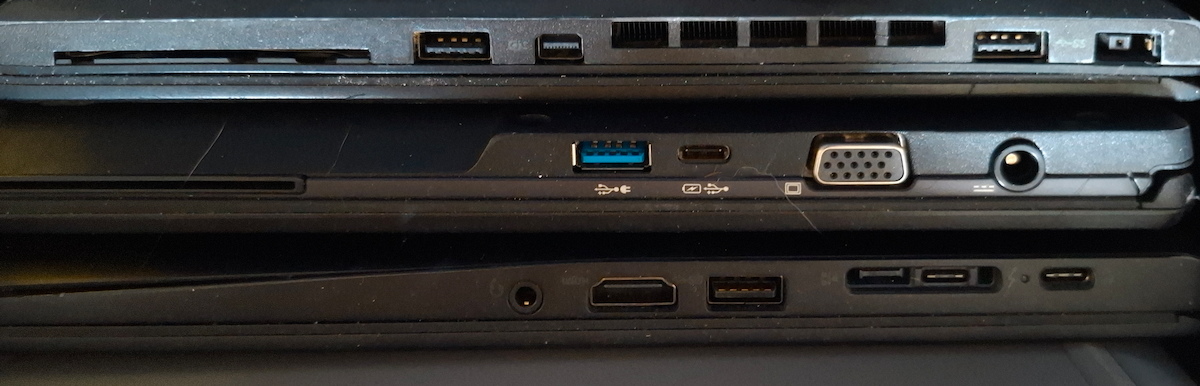
I try to keep my IT usage reasonably environmentally friendly. Not in an extreme way - not using the computers at all would be the best for the planet, but quite impractical - but I do think about the footprint of what I run, and I think most of the community talks about the wrong part of it.
Energy usage is the secondary concern
Whenever “green IT” comes up in self-hosting circles, the conversation almost always goes straight to electricity. People tend to focus on how little power their new hardware uses, but forget about the impact of manufacturing. It takes a lot of energy to make a computer, not to mention scarce resources. Recycling old products is mostly non-existent. Or if it’s ever done, it’s usually done in the cheapest, but harmful ways, e.g. burning plastic to keep the metals. Companies often advertise their products as environmentally friendly due to reduced energy usage, but conveniently forget about those other costs.
Note: power usage is secondary, not irrelevant. Especially if you’re running the device 24/7. I’ll get back to it later.
Reuse what you already have
Before buying anything, I look at my pile of old hardware. An old laptop that’s too slow for daily use is often still perfectly capable of being an experimental machine. An old Android phone or tablet, too slow for a multi-purpose device or with a dead battery, still has a microphone, good quality camera, high-DPI screen and a multi-core CPU in GHz range. You can repurpose it as a dashcam/security camera/wildlife camera, a wall-mounted dashboard for a smart home, or a media player.
Buying second hand
When I do need something I don’t already have, second hand is the default, not new. There’s a market of off-lease laptops - mostly business-class devices such as ThinkPads and Dell Latitudes. “Business” in that case means dull colours, a non-gaming GPU, but a good build quality. They tend to have fewer mechanical problems than “home” series laptops. Corporations replace their hardware every few years to reduce their operational costs, but at home there’s a different economy. Older hardware is more at risk of failing, but that’s acceptable. If you continue using your hardware until it breaks and buy second-hand, you’ll end up with a mixture of different manufacturers and technologies. A logistical nightmare? Not really, why would I care if my service is running on a Lenovo laptop, Dell terminal or Raspberry Pi board if it’s running exactly the same? There is some value in unification, e.g. it’s convenient if your laptops share the same power bricks, or if you can scavenge one computer to repair another one. But don’t sweat too much about it.
Don’t go too old
That doesn’t mean any old hardware will do - there’s a balance. A 20-year-old machine will have a fraction of the processing power of a newer one and you would likely end up using several of them. The risk of failure is high and parts are hard to buy. At some point the electricity and hassle cost outweighs the manufacturing cost you’re avoiding.
Specifically, for a daily-use laptop, I look for one powered by USB-C. It’s really convenient to use the same charger for laptops, phones and 90% of other rechargeable devices. Many, but not all, laptops made after 2018 are USB powered. For experimental devices that I only use at home, I might accept a proprietary barrel connector, but not for the one I travel with.
If you use Windows, remember that Windows 11 requires a newish CPU (8th gen Intel Core, AMD Ryzen 2000). There’s a lot of compatible used devices available (most laptops from 2018 onwards), just be aware when buying. And if you use Linux, that means you can buy a perfectly usable laptop with a 7th gen Core really cheaply.
The same balance applies to routers and switches. A second-hand enterprise switch or router that’s around five years old could be a good buy - it’ll run current firmware, handle the speeds you actually need at home, and draw a sensible amount of power. A switch or router from 20 years ago is a different matter: it doesn’t support current protocols, it draws more power for a fraction of the throughput, and the vendor stopped shipping security updates a long time ago.
What’s actually worth buying new
- PC Power supplies. They don’t last as long as most computer hardware. They have fans and large capacitors which wear down with use, so an old PSU might not have much life left. Then there’s an issue of power efficiency. Old PSUs were horrible when running at low power, when the computer needed 40W, they drew twice as much. New ones are usually certified, 80+ means they are at least 80% efficient. Higher certifications such as 80+ Gold or Platinum are even better, but also considerably more expensive, so do your maths - if they save you $10 per year but cost $100 more, that doesn’t look like a good deal.
- Hard drives. Hard drives have a limited lifespan. Considering that their platters spin at 5400 RPM or more, their heads fly just some nanometers above them and have to be positioned with an almost atomic-level precision, it’s a wonder they work at all! But inevitably they fail. If you can get them very cheaply (free is a good price) and are prepared for failure (you should always be,even with new drives) then go ahead. There’s also a matter of capacity. When you need 2TB of storage, would you rather use a 2TB drive or 10x 200GB? Multiple disks take more power and use precious space in the case. Anything smaller than 1TB is probably useless for a NAS. Though an old and small disk might still be useful for an experimental device.
- Flash-based storage. Such as SSDs, SD cards, thumb drives. You need to be even more careful than with HDDs. While they don’t wear down mechanically, they have a limited number of writes. An old SSD might be already useless. And unlike HDDs which usually show some bad sectors but continue to work, they often fail rapidly.
- Batteries. Batteries degrade even sitting unused on a shelf. When you buy a used laptop, it always has reduced capacity. It could be acceptable. But when it isn’t and you want to replace the battery, get a new one. It can be a 3rd party, doesn’t need to be original - as long as it comes from a trusted supplier.
- Small components. I wouldn’t bother trying to find a used SATA-to-NVMe adapter or a 3.5" to 2.5" HDD caddy. It’s not worth the hassle and I doubt it’s even possible in most cases.
Reducing power usage
Power usage is the second concern after manufacturing impact. Many self-hosters choose single-board computers such as Raspberry Pi for their projects. Some models of Pi Zero use below 1W. They’re a good choice if you need a single-purpose device.
But you will need proper PCs for some stuff. Companies discovered the value of server consolidation in the early 2000s. Virtualization and later containers allowed running multiple separate workloads on one server. For this reason, you might want to stop using very old hardware even if it still works: it’s cheaper to run 2 reasonably modern PCs than 10 very old ones.
One way to use old or low-power hardware (or fewer computers) is to choose your software carefully. 20 years ago computers were used in a very similar way despite being considerably slower. Sometimes you don’t have a choice, because the company standardises on one product. Or maybe the software you’re choosing has high hardware requirements, but also some features you really need. That’s OK. But especially for server software that you only configure once and then it runs quietly in the background doing its job, there’s sometimes an old alternative that needs just a few megabytes of RAM and a new, trendy one that takes 2GB.
Proper configuration matters, too. Modern CPUs scale down when not in use and that should happen automatically with any Linux or Windows system unless you happen to have some buggy combination of hardware, firmware, drivers and OS.
You might also consider powering down HDDs when not in use. Spinning up and down reduces the lifetime of disks, but staying on all the time also has some impact. If you power cycle your HDD every 5 minutes you will kill it in a few months, but one cycle per day shouldn’t be worse than always on. Disks in the home NAS are often unused for hours or days in a row (especially for larger setups with multiple disks). Low power devices might run from SD cards or thumb drives in some cases.
A regular server in the office or datacentre runs 24/7, but that isn’t always necessary at home. You’re not going to use your NAS when you sleep or are away from home, right? It might use some of the time to do backups or other maintenance tasks, but probably doesn’t need that much time. Consider powering up the server only when required to save power, at an inconvenience of having to wait a few minutes when you need it. It’s a tradeoff with different answers for different people.
Choosing computers for self hosting
Raspberry Pi
A default choice for many self-hosters. It’s small and uses very little power. But it’s never been cheap for the processing power you get - an old PC can do the same work as a stack of Pis, but costs next to nothing. But sometimes you need a separate machine and a small form is an important factor. I have two Pis and could certainly use more.
Other single-board computers
Some producers also use Pi in their names, e.g. Banana Pi or Orange Pi, to jump on the bandwagon, but be careful, they have nothing in common with the Raspberry Pi. Others don’t, I think that’s more honest. I experimented with a few and the results were mixed. They offer similar or sometimes better hardware for a fraction of the price, but also get a fraction of the support. Whatever you try to do on the Pi, someone already did that and wrote a blog or posted a video tutorial. On another board, you’re usually on your own. Raspberries will get the newest software in a few days and it’s going to be tested by thousands, on other boards you have to use a 3-year-old version or compile it yourself. If that’s OK for you then go ahead, if you’re new to Linux, you better stick to Raspberry Pis.
Dell Wyse thin clients
They are often cheaper than single-board computers and have similar processing power. They have Intel Atom processors or AMD equivalents, 1 or 2 GB of RAM, some kind of storage such as SD, MMC or even a small HDD. They need a few watts, depending on the exact hardware. Their intended usage is a terminal, usually they run a built-in operating system called ThinOS whose only job is to connect to a virtual desktop server such as Citrix. But it can be replaced with Linux.
Old laptops
You probably already have a few. If not, you can buy them really cheaply. Most only take about 5W when idle and maybe 40W under high load. A broken screen or keyboard is not an issue for server usage. A battery, even if it lost 95% of the original capacity, is useful as a built-in UPS: it’s still good for a few minutes, enough to move around the house or shut down safely during a power outage.
The downside of a laptop is its inconvenient form. If you need to run several at a time, they take up a lot of space if you keep them open - and many will overheat if you run them closed (some don’t mind and you can just pile them). Laptops are hard to repair, especially old ones. If you have several of the same type and know which way to hold a screwdriver, you might use some as organ donors. Or you might get unlucky and all of them will need the same part.
Small form factor PCs
For example Lenovo ThinkCentre. They share many traits with laptops. Just like them they are small, hard to upgrade, moderately power efficient and can run standard PC software. Generally cheaper than laptops when comparing the same generation hardware, easier to fit several in a small space, but lack the built-in UPS functionality.
Proper PCs in tower cases
They have one great feature: the ability to upgrade or replace hardware. You probably need one to use as a storage server (unless you prefer an off-the-shelf NAS). Do you need one for your daily work? If you want some serious processing power, you can get a powerful PC for 1/3 of the price of an equally powerful laptop.
Second-hand servers
I don’t recommend them, unless you know what you’re doing. It’s a surprisingly cheap way to buy really powerful hardware - you can buy one with multiple CPUs, huge RAM and a rack-mountable case for the price of one Pi. But that’s because nobody wants them at home. Some old servers take a few hundred watts even when idle and possibly more than 1kW under load. That’s about the same as a hairdryer, no wonder they make a similar noise! You might consider one if it’s only going to be on occasionally, e.g. if you need a powerful machine for rendering videos or compiling. Having said that, some newer servers are more efficient. Another problem with servers is hardware compatibility: you can get replacement parts for standard PCs everywhere, servers have proprietary power supplies, need hard drive caddies etc.