The config files, commands and measurements behind part 2. For the options and the reasons behind my choices, see part 1.
Hardware comparison
| Serenity | AWS g6e.xlarge | |
|---|---|---|
| GPU | RTX 3050 6GB (Ampere) | L40S 48GB (Ada Lovelace) |
| CUDA cores | 2,304 | 18,176 |
| VRAM bandwidth | 168 GB/s | 864 GB/s |
| Hardware FP8 | No | Yes |
| GPU power limit | 70W | 350W |
| CPU | 2x Xeon E5-2609 v2 (2013) | AMD EPYC 7R13 (2021) |
| Cores / threads | 8 / 8 | 4 vCPUs |
| PassMark single-thread | 1,311 | 2,606 |
| RAM size | 16GB | 32GB |
| RAM bandwidth | 21 GB/s | 205 GB/s |
| Disk | 4TB hard drive | 250GB NVMe (local) and 100GB gp3 |
| Price per hour | ~$0.03 | ~$2 |
The GPU was the most critical difference. VRAM size decides what fits, and VRAM bandwidth decides how fast a dense model generates tokens: each token needs reading all the weights. 864 GB/s divided by 30GB of weights means the theoretical maximum is about 29 tokens/s, without tricks like MTP. I measured 25. Not bad.
On the VM, the CPU was mostly idle. On Serenity, it was heavily loaded. Not because it was vastly underpowered (Serenity has about half the benchmark score for single-threaded work but twice as many cores) or because the model was running on the CPU. That was a mystery.
Until I checked that Serenity, with its puny GPU, was generating 2-3x more tokens per second. That’s what you get with a small model. Each token means some CPU work for vLLM, and from time to time they resulted in a tool call - often a useless one, but it still means an HTTP request and JSON processing.
As usual I checked the GPU usage on Grafana. I could clearly see the first attempt (the script and the failed search), a few minutes of debugging and the second attempt to search.
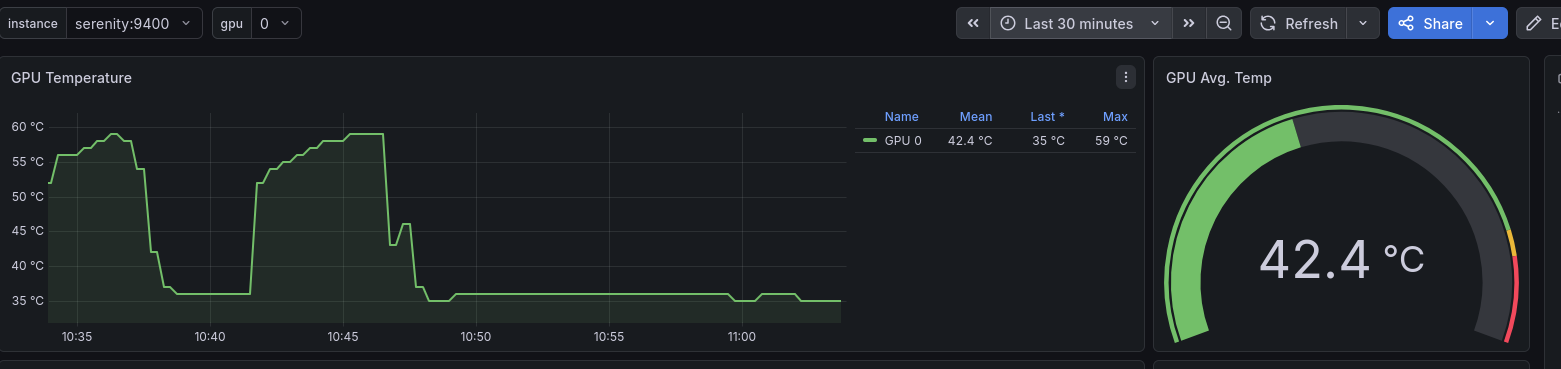
Compose file - Serenity
Both services in one Docker Compose file - the same file will go to the VM, with only the model lines changed.
services:
  vllm:
    image: vllm/vllm-openai:latest
    restart: unless-stopped
    runtime: nvidia
    ipc: host
    ports:
      - "127.0.0.1:8000:8000"
    volumes:
      - hf-cache:/root/.cache/huggingface
    command:
      - --model=Qwen/Qwen3.5-0.8B
      - --served-model-name=qwen3.5-0.8b
      - --language-model-only
      - --gpu-memory-utilization=0.85
      - --max-model-len=32768
      - --max-num-seqs=2
      - --enable-auto-tool-choice
      - --tool-call-parser=qwen3_coder
      - --reasoning-parser=qwen3

  searxng:
    image: docker.io/searxng/searxng:latest
    restart: unless-stopped
    ports:
      - "127.0.0.1:8888:8080"
    volumes:
      - ./searxng/config:/etc/searxng
      - ./searxng/data:/var/cache/searxng

volumes:
  hf-cache:
Most of the vLLM parameters are explained in the vLLM post. New ones:
--language-model-only- Qwen3.5 and Qwen3.6 models have a vision encoder. I’m not going to send them images, so there’s no point wasting VRAM on it.--tool-call-parser=qwen3_coder- as I wrote in part 1, the wrong parser doesn’t fail to start. The model answers in prose and the agent waits forever for a tool call. This is the one recommended in vLLM’s recipes for both Qwen3.5 and Qwen3.6.--reasoning-parser=qwen3- Qwen models think before answering. The parser moves the thinking into a separate field of the response, so the harness can show it (or hide it) instead of treating it as part of the answer.--max-model-len=32768- context length.--max-num-seqs=2- one user, one agent. No need to reserve memory for more.- Both ports are bound to
127.0.0.1. Neither vLLM nor SearXNG has any real authentication, and everything that talks to them runs on the same machine.
SearXNG has one problem out of the box: the JSON API, which is all the agent needs, is disabled. It has to be enabled in searxng/config/settings.yml:
use_default_settings: true

server:
  secret_key: "change-me"
  limiter: false

search:
  formats:
    - html
    - json
use_default_settings: true- takes all the defaults and only overrides what’s listed below. Without it, I’d have to copy the whole (very long) default config.secret_key- SearXNG refuses to start with the default one.openssl rand -hex 32generates a good one.limiter: false- the limiter is a bot protection for public instances. Here, the only “user” is a bot, and it’s my own.
Start both and check that they respond:
docker compose up -d
curl -s localhost:8000/v1/models
curl -s 'localhost:8888/search?q=vllm&format=json' | head -c 500
If SearXNG returns 403 Forbidden, the JSON format is not enabled.
Compose file - VM
Only the command for the vllm container is different. Everything else is the same.
    command:
      - --model=Qwen/Qwen3.6-27B-FP8
      - --served-model-name=qwen3.6-27b
      - --language-model-only
      - --gpu-memory-utilization=0.92
      - --max-model-len=131072
      - --max-num-seqs=2
      - --enable-auto-tool-choice
      - --tool-call-parser=qwen3_coder
      - --reasoning-parser=qwen3
Testing tool calling without the agent
One thing I skipped in Part 2 for clarity. Before starting Pi, I checked that vLLM really returns tool calls, not prose. If that worked and Pi didn’t, I’d know which part to debug.
A single request with curl calling a fake tool:
curl -s localhost:8000/v1/chat/completions \
  -H 'Content-Type: application/json' \
  -d '{
    "model": "qwen3.5-0.8b",
    "messages": [{"role": "user", "content": "What is the weather in London?"}],
    "tools": [{
      "type": "function",
      "function": {
        "name": "get_weather",
        "description": "Get current weather for a city",
        "parameters": {
          "type": "object",
          "properties": {"city": {"type": "string"}},
          "required": ["city"]
        }
      }
    }]
  }' | jq '.choices[0].message'
The answer should have a tool_calls array with get_weather and {"city": "London"}, and an empty content. If the call is inside content as text, the parser is wrong.
And even the tiny model on Serenity got it right:
{
  "role": "assistant",
  "content": null,
  "refusal": null,
  "annotations": null,
  "audio": null,
  "function_call": null,
  "tool_calls": [
    {
      "id": "chatcmpl-tool-aff582800ee584d6",
      "type": "function",
      "function": {
        "name": "get_weather",
        "arguments": "{\"city\": \"London\"}"
      }
    }
  ],
  "reasoning": null
}
The reasoning field is there, but empty - for a question this simple the model didn’t think at all.
Pi configuration
Three files there are relevant.
models.json - tells Pi where the model is. vLLM speaks the OpenAI Chat Completions API, which Pi supports out of the box:
{
  "providers": {
    "vllm": {
      "baseUrl": "http://localhost:8000/v1",
      "api": "openai-completions",
      "apiKey": "none",
      "compat": { "thinkingFormat": "qwen-chat-template" },
      "models": [
        { "id": "qwen3.5-0.8b", "contextWindow": 32768, "reasoning": true }
      ]
    }
  }
}
idhas to match--served-model-namefrom the compose file.apiKeyis a dummy - vLLM doesn’t check it, but Pi only shows models from providers that have one.contextWindow- Pi knows nothing about a custom model, so it assumes 128K. vLLM only allows 32K, so without this Pi would happily keep growing the conversation past the limit instead of compacting it, and vLLM would start rejecting the requests.reasoningandthinkingFormat- by default Pi assumes a custom model can’t think. These two tell it that it can, and how to switch the thinking on and off for Qwen models.
pi --list-models shows whether Pi picked it up:
provider  model         context  max-out  thinking  images
vllm      qwen3.5-0.8b  32.8K    16.4K    yes       no
mcp.json - the web search. mcp-searxng can run with npx (Node.js 22 or newer) or in Docker. I chose Docker, so I don’t need to care about the Node version on the host:
{
  "mcpServers": {
    "searxng": {
      "command": "docker",
      "args": ["run", "-i", "--rm", "--network", "host",
               "-e", "SEARXNG_URL", "isokoliuk/mcp-searxng:latest"],
      "env": { "SEARXNG_URL": "http://localhost:8888" },
      "exposure": "direct"
    }
  }
}
--network host is needed because SearXNG listens on the host’s 127.0.0.1, which is not reachable from a container on the default Docker network.
"exposure": "direct" is the most important line in this file, and it wasn’t present in my first version - see below what happened without it.
pi mcp list connects to all configured servers and prints their tools - a quick way to check it works without starting a session. mcp-searxng has four: searxng_web_search, web_url_read, searxng_search_suggestions and searxng_instance_info.
searxng: connected, 4 tools (direct, global)
  docker run -i --rm --network host -e SEARXNG_URL isokoliuk/mcp-searxng:latest
  tools: searxng_web_search, searxng_search_suggestions, searxng_instance_info, web_url_read
  offers resources
The first run took 25 seconds, mostly downloading the Docker image.
extensions/ - the permission gate. As I wrote in part 1, Pi runs every command without asking. On a disposable VM I can live with that, but Serenity is a real machine with real data. The example extension from the Pi repository asks for confirmation before rm -rf, sudo, chmod 777 and a few similar commands:
mkdir -p ~/.pi/agent/extensions
curl -fsSL -o ~/.pi/agent/extensions/permission-gate.ts \
  https://raw.githubusercontent.com/earendil-works/pi/main/packages/coding-agent/examples/extensions/permission-gate.ts
That’s far from a proper guardrail, but better than nothing. For the rehearsal I also ran Pi in a fresh test directory, with no git credentials or API keys in the environment.
There’s no need to enable the permission gate - Pi loads everything from ~/.pi/agent/extensions/ automatically. In non-interactive mode (pi -p), where there’s nobody to ask, the extension simply blocks dangerous commands.
What broke during the first tries on Serenity
I had a good intuition to do the rehearsal and fix the commands before trying the VM. vLLM and SearXNG worked on the first try, all the problems were on the Pi side:
- Pi hung without doing anything. My first scripted attempt seemed to hang, it didn’t send any request to vLLM. I waited for a few minutes, stopped it and investigated. As it turned out, Pi reads standard input and adds it to the prompt - and in a script, standard input never ends. Hence the
</dev/nullin the commands above. - The model didn’t see the web search. By default, Pi doesn’t show MCP tools to the model directly. They are hidden behind a single
codemodetool: the system prompt only says that amcp__searxngserver exists, and the model has to write a JavaScript snippet that finds the search tool and calls it. It’s a clever way to save context when there are dozens of MCP tools, but the 0.8B model never figured it out. Instead, in 5 minutes it made 94 calls ofbash:curlto made-up URLs,pip search(search function doesn’t work for pip since 2021, and pip is not installed on Serenity),xxd… and once tried to call a tool namedsearxng, which doesn’t exist either. Then my timeout killed it."exposure": "direct"inmcp.jsonmakes Pi declare the tools to the model like the built-in ones - and the next run took 17 seconds. Like the wrong tool-call parser, this one doesn’t fail loudly - the agent just tries to work around the missing tool. - Pi didn’t know the context window. Without
contextWindowinmodels.json, Pi assumes 128K for a custom model. Nothing broke during the short tests, but in a long session it would.
One more thing I noticed in the vLLM logs: Prefix cache hit rate: 0.0%. Prefix caching - reusing the computation for the part of the conversation that didn’t change since the previous turn - was turned off for this model by default (more about it below). During the failed search run, Pi sent 40 requests in 5 minutes, each with the whole conversation, growing to about 24K tokens. Every one of them was processed from scratch, which hurts performance.
Ready for the real test
I prepared the files to copy:
docker-compose.yml- with the model lines changed,searxng/config/settings.yml- with a newsecret_key,~/.pi/agent/models.json- with the new model ID and context window,~/.pi/agent/mcp.json,~/.pi/agent/extensions/permission-gate.ts.
Update: Pi 1.6.1
Pi is developed quickly. In the few days I spent preparing this post, I went through three versions:
- The rehearsal with 1.5.2.
- Version 1.6.0 came out just a few hours later on the same day (20th November), so that’s what I got on the VM.
- On the 25th, when I was writing it and wanted to check a few things on Serenity, Pi prompted me to update to 1.6.1.
When Pi updates itself, it installs the new version next to the old one, in ~/.pi/agent/install/releases/. All my config files worked without changes.
So, what changed? Most of the changelog is about commercial models and their providers. The things that may matter for a self-hosted setup:
- Connection errors (1.6.0) - Pi now retries when the error has only a socket code, like
ECONNRESETorETIMEDOUT. 1.6.1 adds a few more kinds of temporary errors. - System prompt (1.6.0) - OpenAI-compatible servers other than OpenAI itself now get it with the
systemrole. The bug was reported for Qwen models on Groq, which rejected the request. vLLM worked for me on all three versions. - MCP (1.6.1) - no more timeouts with servers that return request IDs as strings. Also, large responses over HTTP no longer block Pi for seconds (my search server runs locally over stdio, so that one doesn’t apply).
- The
bashtool - when the output ended with a very long line, the model could get no output at all. Both versions fix some cases of that. And Pi 1.6.1 no longer crashes when it can’t write the full output to a temporary file, for example because/tmpis full. - Security (1.6.0) - an update of
undici, the HTTP library, fixing six security advisories. - llama.cpp (1.6.0) - if you use it instead of vLLM: Pi’s extension now connects to port 9931 by default (the new default of llama-server), not 8080.
There are breaking changes, but small ones: the showCacheMissNotices setting was split into four (and is migrated automatically), and extensions that modify the rendered output in place need a fix. The permission gate example is identical in 1.5.2 and 1.6.1.
No fixes for my problems from the What broke section. Maybe if I waited a few more days.
AWS details
When I logged in, AWS required me to reset my password “for security concerns” (that was despite having 2FA with a TOTP app). There was no unusual activity on the account - in fact, no activity at all for a year or so - so maybe reactivating a previously dormant account seemed suspicious to their systems.
I upgraded to the paid plan, verified my card and set the monthly budget to $10 (that means a warning, not a hard limit - I don’t want to get a surprise invoice if I forget to power off the VM). Then I requested a quota increase to 4 vCPUs for GPU instances - because the standard limit is exactly 0. A moment later I got a notification that the request requires manual approval, and a support case was created.
It was quite an annoying process - so many steps just to run a short test. Now, I had to wait and see what happens sooner: AWS approves my quota request or Lightning comes back. Spoiler: AWS needed 2 hours and Lightning is still down at the moment of writing this.
I checked the prices in several regions, us-east-1 seemed to be the cheapest. Instance type g6e.xlarge should be enough. I also checked Azure, which didn’t have L40S, but it had a good deal on A100. Noted in case I need a more powerful GPU in future.
| Option | GPU | vCPU / RAM | $/h on-demand |
|---|---|---|---|
| AWS g6e.xlarge, us-east-1 | 1× L40S 48GB | 4 / 32 GiB, 250GB local NVMe | $1.861 |
| AWS g6e.2xlarge, us-east-1 | 1× L40S 48GB | 8 / 64 GiB, 450GB local NVMe | $2.242 |
| AWS g6e.xlarge, Frankfurt | 1× L40S 48GB | 4 / 32 GiB, 250GB local NVMe | $2.327 |
| Azure NC24ads A100 v4, East US | 1× A100 80GB | 24 / 220 GiB | $3.673 |
| Azure NC40ads H100 v5, East US | 1× H100 94GB | 40 / 320 GiB | $6.98 |
I started the VM with:
- the Deep Learning Base AMI with Ubuntu 24.04 - it already has the NVIDIA driver, Docker and the NVIDIA container runtime,
- a 100GB gp3 root disk,
- a new SSH key, used only for this VM, and a security group that only lets in SSH, and only from my home IP,
- the instance-initiated shutdown behaviour set to “terminate”, and
shutdown -h +240in the user data. After 4 hours the VM powers itself off and disappears with all its disks. That’s in case I forget to power off when done (and if I needed more time, I could cancel the shutdown).
Having a quota doesn’t mean there’s a GPU available. On the first try, there was no g6e.xlarge free in any of the four zones in us-east-1 that have them (InsufficientInstanceCapacity). I tried again a few minutes later and this time it worked.
Moving Docker to the NVMe disk
The root disk has 96GB, but the AMI already takes 51GB of it. The vLLM image is 36GB after unpacking and the model is another 29GB, so they wouldn’t both fit. The instance also has a 250GB local NVMe disk, mounted at /opt/dlami/nvme, almost empty (it’s wiped when the VM stops, but mine is disposable anyway).
Changing Docker’s data-root is not enough. Docker 29 on this AMI keeps the images in containerd’s directory, so I moved both before I pulled Docker images.
sudo systemctl stop docker.socket docker containerd
sudo mkdir -p /opt/dlami/nvme/docker /opt/dlami/nvme/containerd

sudo jq '. + {"data-root": "/opt/dlami/nvme/docker"}' /etc/docker/daemon.json > /tmp/daemon.json
sudo cp /tmp/daemon.json /etc/docker/daemon.json
sudo sed -i '1i root = "/opt/dlami/nvme/containerd"' /etc/containerd/config.toml

sudo systemctl start containerd docker
docker info | grep 'Root Dir'
sudo containerd config dump | grep '^root'
Starting everything on the VM
mkdir -p ~/coding-agent/searxng/config ~/coding-agent/searxng/data
cd ~/coding-agent
docker pull vllm/vllm-openai:latest
docker compose up -d
docker pull isokoliuk/mcp-searxng:latest
curl -s localhost:8000/v1/models
curl -s 'localhost:8888/search?q=vllm&format=json' | head -c 500
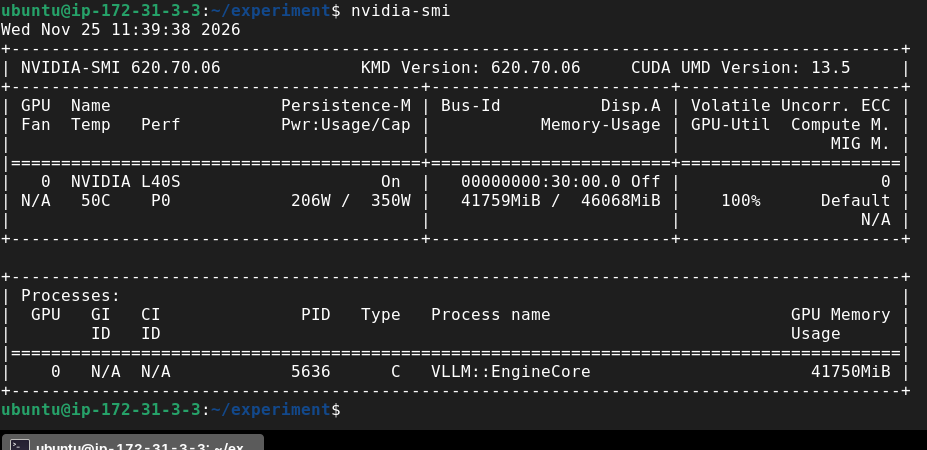
During the first agent task, nvidia-smi showed the GPU busy at 100%, using 206W of its 350W. vLLM takes 41.7GB of the 46GB, but that doesn’t mean the model needs that much: with --gpu-memory-utilization=0.92 it reserves 92% of the memory up front, and everything left after the weights goes to the KV cache.
Prefix caching
Prefix caching was off by default during the Serenity rehearsal, on the VM it was on: I could see enable_prefix_caching=True in the log. After the first tests, the hit rate was between 53% and 63%.
Was it the model or the newer vLLM version that made the difference? I checked it later on Serenity, with the same small model, the same flags and an 8-turn conversation growing from 5K to 14K tokens:
| Qwen3.5-0.8B on Serenity | Prefix cache hit rate | First token, turn 2 | First token, turn 8 | KV cache |
|---|---|---|---|---|
| vLLM 0.27.1 | off | 0.82 s | 1.97 s | 218,624 tokens |
vLLM 0.27.1, --enable-prefix-caching | 78.7% | 0.28 s | 0.37 s | 208,834 tokens |
| vLLM 0.34.0 | 79.6% | 0.25 s | 0.35 s | 183,604 tokens |
So it’s the version - a changed default, to be precise. Qwen3.5 and Qwen3.6 are hybrid models: some layers use linear attention instead of the usual one, which makes caching harder. In 0.27.1 it’s off for them and when turned on, vLLM warns that it’s experimental. In 0.34.0 it’s on, with no warning. On older versions, it’s worth adding --enable-prefix-caching. The time to first token dropped 3-5x.
Measuring performance
vLLM prints the speed in its log, every 10 seconds:
Engine 000: Avg prompt throughput: 27.5 tokens/s, Avg generation throughput: 25.3 tokens/s, Running: 1 reqs, ...
That’s the number of tokens generated in the last 10 seconds, divided by 10 seconds. It’s accurate while the model generates. But a coding agent often leaves it idle: Pi runs the tests, the permission gate waits for me, or vLLM is reading a long prompt. Then the average drops. It’s good for a quick check, as long as you look at a line where the model was busy for the whole 10 seconds.
For the numbers in this post I used two other ways.
Fixed prompts. A short script sends a request directly to vLLM, without the agent, and measures the time itself. The API response says how many tokens were generated, but not how long it took. ignore_eos makes the model generate exactly 800 tokens, even if it wants to finish earlier, and streaming lets me measure from the first token to the last, so the time of reading the prompt is not included:
import json, time, urllib.request

def call(prompt, n=800):
    body = json.dumps({
        "model": "qwen3.6-27b",
        "messages": [{"role": "user", "content": prompt}],
        "max_tokens": n, "ignore_eos": True, "temperature": 0,
        "stream": True, "stream_options": {"include_usage": True},
        "chat_template_kwargs": {"enable_thinking": False},
    }).encode()
    req = urllib.request.Request("http://localhost:8000/v1/chat/completions",
                                 body, {"Content-Type": "application/json"})
    first = tokens = None
    for line in urllib.request.urlopen(req, timeout=300):
        if not line.startswith(b"data: {"):
            continue
        d = json.loads(line[6:])
        if d.get("usage"):
            tokens = d["usage"]["completion_tokens"]
        if first is None and d["choices"] and d["choices"][0]["delta"].get("content"):
            first = time.time()
    return (tokens - 1) / (time.time() - first)

call("Hi", 20)  # warm-up
print(f'{call("Explain how a Linux system boots, in about 600 words."):.1f} tok/s')
I ran each of the three prompts twice.
The agent task. vLLM also has a /metrics endpoint, for Prometheus. There’s no speed there, only counters: generated tokens and a histogram of the time between tokens. I saved them before and after the task:
curl -s localhost:8000/metrics | grep -E '^vllm:(generation_tokens_total|inter_token_latency_seconds_sum)' > before.txt
The rest is a subtraction and a division. Without MTP: 8,155 tokens in 329.3 seconds of generation, 24.8 tokens/s. With MTP: 7,238 tokens in 154.5 seconds, 46.9 tokens/s. That’s only the generation, without reading the prompt and without the time when Pi was running commands.
vLLM also has its own benchmark, vllm bench serve, which prints tokens/s directly. I didn’t use it, because it sends its own test prompts.