In part 1, I reviewed several backup solutions and hated most of them. Borg seemed to be the least repulsive; I ended up almost liking it.
Installing and configuring with Ansible
Two Ansible roles: borg_client is applied to every host that needs backing up. Firefly, which is both the client and the target, only backs up /etc. My laptop backs up /etc and my home dir, with some exclusions. The role also delegates some tasks to the Borg server - mainly, creating a dedicated user account (one per each client) and the directory. Since Borg writes lots of small files, and btrfs’s copy-on-write fragments badly under that pattern, the repository directory gets chattr +C applied before any repo is created in it. Which means btrfs will not do checksumming for that directory, but Borg already does chunk-level integrity checking.
Second role borg_server, applied only to firefly, doesn’t actually install the server - there’s no separate client and server app, the same binary does both. Instead, it configures retention (deleting old archives) and compacting the repositories.
Locking down the server side
Each client gets its own dedicated SSH key and its own dedicated Unix account on firefly. The account’s authorized_keys entry is what actually enforces append-only:
command="borg serve --restrict-to-path /data/noshare/borg/<client> --append-only",restrict
–restrict-to-path confines that key to its own client’s repository and nothing else on the box; restrict (modern OpenSSH shorthand) turns off port/agent/X11 forwarding and PTY allocation. The account’s shell is /bin/sh, not nologin - that one tripped me up, since nologin seemed like the more locked-down choice, but sshd runs the forced command= through the account’s configured shell, and nologin refuses to run anything at all, forced command included.
Passphrases without leaving a trace
Passphrases live in Ansible Vault and get written once to a file readable only by root, then handed to the backup service via systemd’s LoadCredential=, which copies them into a private, auto-cleaned runtime directory for just that one run. The script reads it with:
BORG_PASSCOMMAND="cat ${CREDENTIALS_DIRECTORY}/borg-passphrase"
instead of setting BORG_PASSPHRASE directly - Borg runs that command whenever it needs the passphrase, so the value never sits in the process environment (readable via /proc/<pid>/environ) or in the deployed script itself.
Coping with a laptop that isn’t always on
My laptop travels with me, so it often ends up on another network than my NAS. Rather than let every missed connection be treated as a failed backup, the script sets a short connect timeout and inspects what Borg’s output actually says before deciding whether to fail:
BORG_RSH="ssh -o ConnectTimeout=10 -o BatchMode=yes ..."
Timeout, refused, unreachable, DNS failure - logged and treated as “nothing to do this run” (exit 0). Anything else - a real auth failure, a full disk, repo corruption - still exits non-zero.
Everything is scheduled through systemd timers rather than cron, mainly for Persistent=true - a laptop that’s asleep at 2am simply runs its backup on next wake instead of silently skipping it.
The end result: every night, each machine pushes an encrypted, deduplicated, tamper-resistant backup to firefly, and I don’t have to think about it again until I actually need a restore.
What I didn’t like
- My perfect backup software would have both a full-featured CLI and a GUI. I want CLI for scripting, but GUI would be better for less-used operations, such as “find and compare several past versions of this file to see which one I need”. There are 3rd party GUIs, I might try one some day.
- Some server-side configuration is done by the client role. I couldn’t find any other sane way.
- I have to keep passwords in plain text in one file on the server (readable only by root, but still). That is a tough choice. I want per-client encryption, but also the scripts running on the server need a way to access the repository for pruning and compacting, so they need to have access to the encryption key (since the clients use append-only mode, they can’t handle that, it has to be done server-side).
What I liked
- Borg plays well with the way I already use my Linux machines: it uses SSH, it’s scriptable, doesn’t need a GUI, it can be easily configured with Ansible. I expected that since every client needs a separate user account, SSH keypair and cron/systemd jobs, adding another machine would be a long process. I admit I spent an hour or two writing the playbook. But after that, it’s now dead simple: just add borg_client role to the new client’s playbook, add new password to the vault, configure includes/excludes if you want to back up something more than /etc - and that’s it, Ansible will do the rest.
- Borg deduplicates and compresses at the chunk level, so daily backups of mostly-unchanged data cost very little extra space.
- Encryption and authentication is always on - another layer of security, maybe overkill for an encrypted NAS on a trusted LAN, but I’m getting it for free.
- The append-only mode is a killer feature. A client only gets permission to add new archives to its repository on the server, never to delete or rewrite existing ones. If a client machine is ever compromised (e.g. by ransomware), the attacker can’t destroy the backups along with the live data.
Verifying backups and restoring files
A good backup system doesn’t get in your way - it just does its job silently. Which means until you test the backup, you can’t be sure if it works.
Checking if the backup ran
Since I use a systemd timer, it’s easy to get status of the last run:
systemctl status borg-backup.timer
systemctl status borg-backup.service
If the service failed, journalctl -u borg-backup.service has more details - including the “nothing to do this run” cases from a laptop that was offline, which exit 0.
Viewing the Borg repo from the client
Append-only mode doesn’t stop a client reading its own repository - it only blocks deleting or overwriting existing archives, read-only commands work fine. I need to set 3 environment variables to provide SSH key, password and server hostname. That’s too much typing. My Ansible playbook, in addition to the backup script and systemd configs, also generates a script for accessing the borg repo, with proper content for each client. It’s placed at /usr/local/sbin/borg-access.sh with 0700 permissions.
#!/bin/bash
set -uo pipefail

export BORG_REPO="ssh://{{ borg_client_user }}@{{ borg_server_host }}:{{ ssh_port }}{{ borg_repo_root }}/{{ inventory_hostname }}"
export BORG_RSH="ssh -i {{ borg_client_ssh_key_path }} -o StrictHostKeyChecking=accept-new -o ConnectTimeout=10 -o BatchMode=yes -p {{ ssh_port }}"
export BORG_PASSCOMMAND="cat {{ borg_client_passphrase_file }}"

exec borg "$@"
Now, as root or with sudo:
borg-access.sh listshows all archives on the serverborg-access.sh infoshows original, compressed and deduplicated size of all archives combined (the last one is how much disk space it uses)borg-access.sh info ood-2026-07-27_02:34:20shows the same values, but for a specific archiveborg-access.sh list ood-2026-07-27_02:34:20lists all files in a specific archive (add a specific path you’re looking for, or pipe to grep or less)
All of these are also possible on the server. I would use local paths instead of SSH. But I didn’t prepare a script for that.
Testing a restore (or: restoring a specific file for real)
The most definitive way to prove the backup system is working is to restore some files. Company policies usually mandate regular restore tests, it’s a good idea to do it at home too. Of course, if you accidentally deleted a file or want to go back to a previous version, the procedure is the same.
The same script also does the restore. I can restore a specific file if I know the exact path. Borg restores relative to the current directory, if I want to restore in-place, I need to cd / first. If I don’t want to replace the existing file (e.g. to compare current and archived version), I just need to cd somewhere else. Then I run borg-access.sh extract ::ood-2026-07-20_20:31:05 home/igor/.bash_history
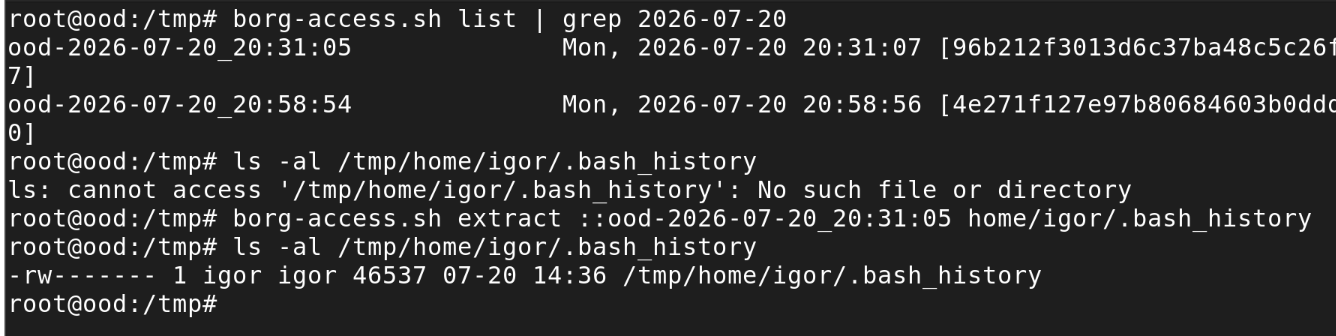
If I want to look around the archive, I can mount it with FUSE: borg-access.sh mount ::ood-2026-07-20_20:31:05 /mnt/
Restoring everything
If the machine is gone, I can’t use this way anymore. Even after I reinstall (I don’t back up the whole system, just the data). SSH private key, stored in /root, is not backed up anywhere and not stored in Ansible. That’s intentional, a tradeoff between security and easy bare metal restore. I decided it’s unlikely, so I don’t need an easy process.
What I would need to do instead is log in to firefly, which doesn’t need SSH - it can use local paths /data/noshare/borg/<client>. It needs the passphrase, but it’s stored in firefly and in Ansible vault.
Or: I can replace the SSH keypair manually. That would probably work, I haven’t tested it though.
How this could be automated
Automating the checks is left as an exercise for the reader. What is possible, and would make it close to an enterprise backup system:
- I already run Prometheus and Grafana. I could make the backup script write its exit status, timestamp and archive size to a file via node exporter’s textfile collector and scrape that. Then, a Grafana dashboard to see backup jobs and Alertmanager rule to notify of a failed backup.
- An automated restore test: a script run by the systemd timer that extracts a known canary file from the latest archive, checksums it, and notifies if something is wrong.
I haven’t done it and currently I have no plans to do it. I think my system is robust enough for home use.